

Industry
BPO and contact centres
Agents who can see the queue, supervisors who can hear the call, and a service level you know while the shift is still running, with WhatsApp and live chat in the same queues as voice.
What usually goes wrong
The service level, a week late
The client asks why answer times slipped on Tuesday. The team leader finds out from the monthly report, long after anything could be done about it.
Quality control by walking the floor
Supervisors can only coach the calls they happen to be standing next to, and new agents learn by getting it wrong with a real customer.
Voice here, WhatsApp somewhere else
Calls come through the phone system and messages through a phone on a desk, so nobody can say how many customers are waiting, or for how long.
How 3CX handles it
Queues and routing strategies
To the agent who has waited longest, to the whole group at once, or to each in turn, with callers kept in order and offered a callback. Skill-based routing, to the agent best placed to take the call, is on AI.
A wallboard and SLA alerts
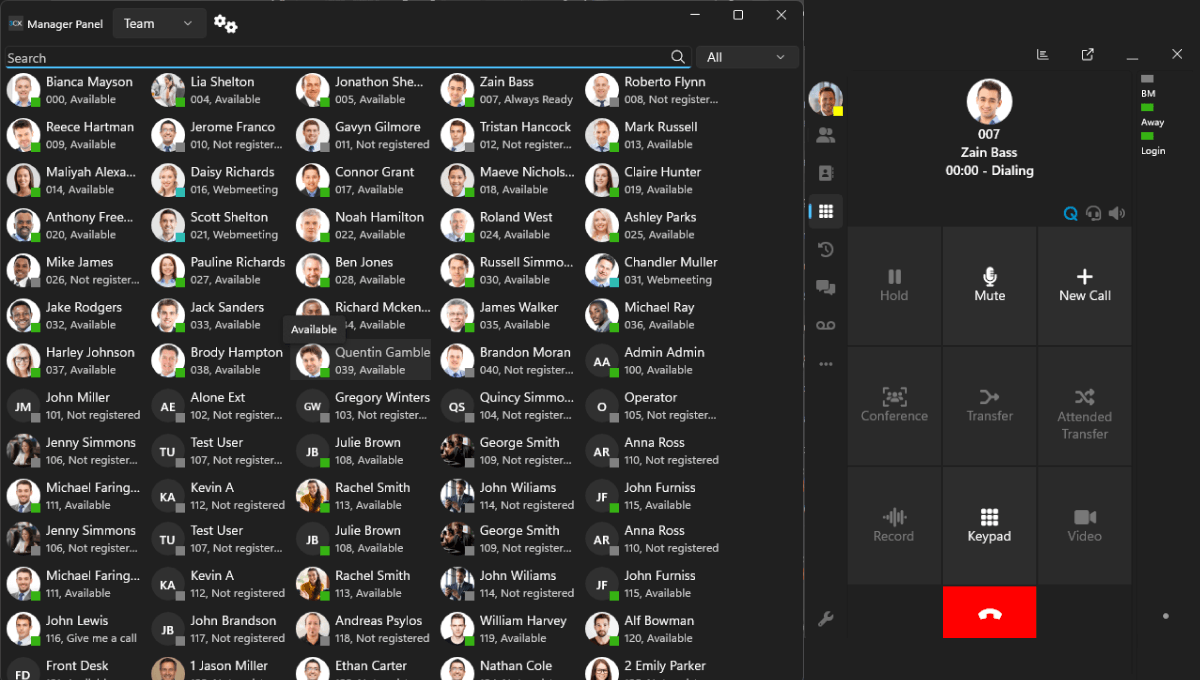
Calls waiting, the longest wait and agents free, on a screen the whole floor can see, and an alert when answer times slip, while there is still time to act.
Listen, whisper and barge in
Supervisors coach live calls without the customer hearing, and join the call when it needs them. It is how new agents get good quickly.
Messages in the same queues
WhatsApp, Facebook and website live chat routed to agents like calls, so one team works one queue. WhatsApp and Facebook on Pro.
Reports clients can be sent
Queue, agent and service-level reports per client line, and data connectors to your own BI tools from 16 calls at once.
Quality checks at scale
Calls recorded on Pro. On AI, transcribed and summarised with a sentiment score, so quality teams review far more calls than they could by ear.
How a contact goes through the floor
-
into the queue
The customer calls or writes
On the client's number, WhatsApp or the website chat.
-
next free agent
The queue
Calls and messages in order, to the next free agent, or by skill on AI.
-
The agent
Answers with the customer's history, while the supervisor can listen, whisper or join.
The wallboard shows the queue as it builds, and an SLA alert tells the team leader the moment answer times slip.
What we set up for you
The floor
- Queues and routing strategies for each client line
- Agent logins, wrap-up time and the wallboards on the floor screens
- WhatsApp and live chat routed into the same queues
- Advice on sizing your provider's SIP trunk for your peak hour, not an average one
- The floor's desk phones connected through the 3CX SBC when the system is hosted away from the building
The supervision
- Service levels and SLA alerts per queue
- A recording policy, and where the recordings are kept
- CRM integration where 3CX supports your system
- Training for supervisors on coaching and reports, and for agents on the client
What a contact centre needs from each edition
| Capability | Basic | Pro | AI |
|---|---|---|---|
| Call queues and queue strategies | Not included | Included | Included |
| Live wallboard | Not included | Included | Included |
| Listen in, whisper and barge in | Not included | Included | Included |
| SLA alerting | Not included | Included | Included |
| WhatsApp and Facebook | Not included | Included | Included |
| Call recording | Not included | Included | Included |
| Skill-based routing | Not included | Not included | Included |
| Call transcription, summaries and sentiment Through Google or OpenAI, or on your own server from 16 calls at once | Not included | Not included | Included |
Our recommendation
Pro runs a contact centre properly. AI is worth it when calls need routing by skill, or when quality teams want every call transcribed and scored.
A dedicated server, sized to the floor
Hosted in Nairobi on a dedicated server, so the floor shares its capacity with nobody, or on your premises if the building is where your clients want the calls handled.
Questions contact centres ask us
Can we run several clients' lines on one system?
Yes. Each client gets its own number, queue, greeting and service level, and agents trained on more than one client can sit in several queues. Each client's report is then theirs alone.
Can a supervisor listen to a call without the customer knowing?
Yes, on Pro. Listen is silent. Whisper lets the supervisor coach the agent without the customer hearing. Barge in joins the call when it needs a senior voice.
We run outbound campaigns. Should we ask before buying?
Yes, please do. Inbound is where 3CX is strongest, and outbound dialling is where contact centre products differ most. Tell us what your campaign actually does and we will show you on a live system what 3CX does and does not do, before you buy rather than after.
How is the licence sized for a contact centre?
By calls at once, and each tier also has a user ceiling. In an office only a fraction of the staff are on the phone together; on a contact centre floor most agents are, so the licence follows the size of the floor. We size it from your peak hour, not from a rule of thumb.
See it on a real system
A 30-minute session on a live system, walked through in your own terms. No obligation.
We confirm your slot within 24 hours. Prefer to write? Email or message us.